To unlock your creativity and turn visitors into buyers

Photo by Arina Krasnikova from Pexels
What Is a Landing Page?
It's a single web page designed with a specific purpose in mind, converting visitors into leads or buyers, and with a clear and direct call to action to persuade readers to take the desired action.
People often think landing pages and home pages are the same. That’s wrong! But what’s the difference between a landing page and a home page?
As I’ve mentioned above, a landing page is a standalone page with a single message and a clear goal.
When people click on a link, they “land” on a page. And that’s the landing page. What they will do next depends on your landing page's goal.
Are you giving away free stuff, such as a PDF, an ebook, infographics, etc., or are you asking them to grab a seat for your webinar?
Whatever it is, you need a landing page and a form to collect email addresses, grow your list, and build relationships.
The homepage is the first page of a website with a navigation menu that links to other pages on the website. It’s like a store window that shows what you can find on the entire website.
Landing Page vs Sales Pages
The first difference between a landing page and a sales page is the goal you want to achieve.
As I mentioned above, a landing page is the page where readers land after clicking a form or a link with one specific goal: generating leads.
It has to be concise and tell readers why they have to sign up, highlighting the benefits they will get.
The goal of a sales page is to sell a product or a service. It’s longer and more detailed than a landing page.
The higher the price of your product or service, the longer your sales page will be.
That’s because you have to persuade people to buy from you, and you have to present your offer, the benefits, a strong reason to buy, and how your product can solve their problems.
You have to include testimonials, a money-back guarantee, a bonus, a very strong call to action, and a P.S. to summarize the offer, adding urgency to motivate people to act with no doubts.
The Anatomy of a High-Converting Landing Page
The first and most important part of a landing page is the headline. It must be short, clear, and direct to tell your reader what the offer is about.
In the subhead, you can reinforce what you have said in your headline, stressing your USP (Unique Selling Proposition).
The hero image is the visual element that best describes your product. Or you can use a video to explain how to use the product.
In the offer section, you have to present your product and explain to your readers what your product can do for them.
The second most important element in a landing page is the CTA button.
Create your CTA with the goal of your landing page in mind and be direct.
Never use a general CTA like “subscribe”, “submit”, etc., but go straight to the point and tell your reader “exactly” what to do.
For example, “Save My Seat”, “Book Your Free Consultation Now”, “Download Your Free Template”, etc.
The CTA button has to be in contrast with the color of the Landing Page to stand out from the other elements of the page.
The font size of your CTA can’t be bigger than the font size of the header.
What Is the Ideal Length for a Landing Page?
The length of a landing page depends on the purpose of your landing page.
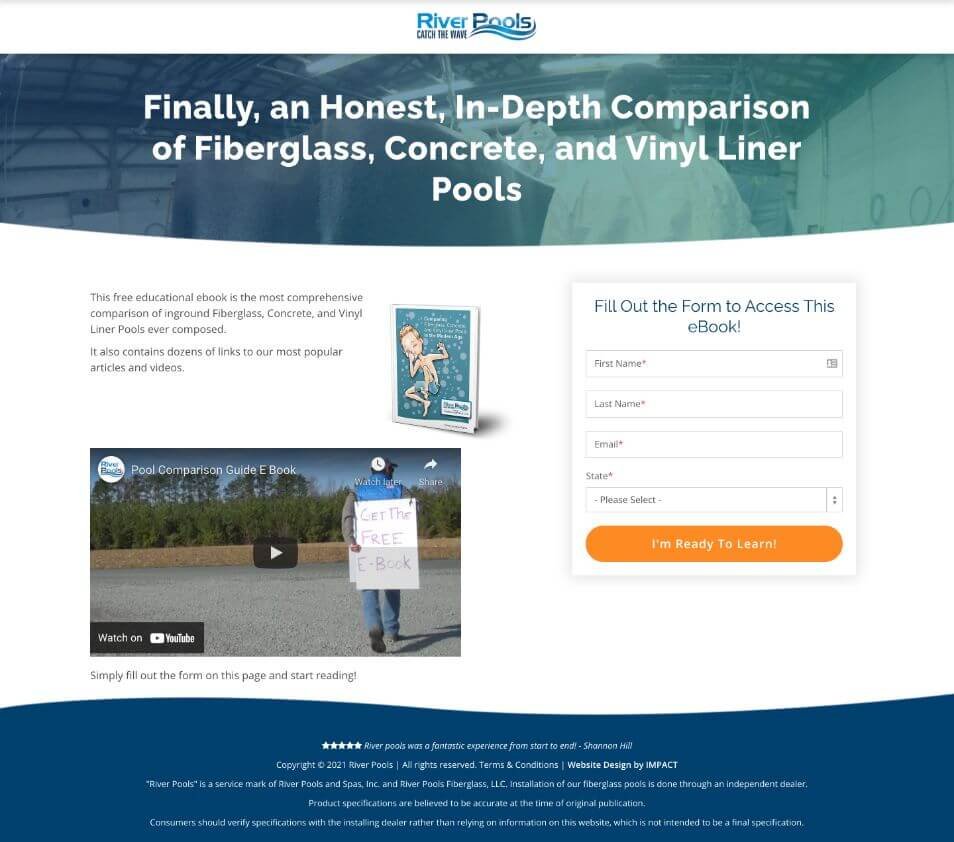
You can design a short landing page if you have a low-priced offer, a subscription for a webinar, a free download, and any actions that do not require a lot of information to persuade people to hit the CTA button.
Here’s an example of a short landing page:
Source: IMPACT
When you have a high-ticket product, you need a landing page longer than the basic one, and you can add other elements to reinforce the reasons why your reader has to take action.
You can add social proof like testimonials, video testimonials, success stories of people who have already solved a problem and are happy with your product, logos of the clients you have worked with, etc.
Never use fake social proof because it can destroy your brand reputation, and people won’t trust you.
You can also add a FAQ section to anticipate and overcome objections, a feature/benefit list using bullet points, the company’s story, a guarantee, and a secure payment section with credit card logos.
Add a second CTA below the fold as a reminder of the first CTA above the fold, so your reader can take action without scrolling up to the CTA above the fold.
You can add multiple CTA buttons across your landing page, especially with long-form landing pages, but use them strategically. Don’t overdo it.
Types of Landing Pages
There are different kinds of landing pages:
Squeeze Pages
Lead Capture Pages
Advertorial
Click-Through Landing Page
Referral Landing Page
Splash Page
Video Landing Page
New Product Landing Page
404 Landing Page
Sales Page
Thank You Page
Unsubscribe Page
A Squeeze Page is a landing page with the specific goal of gathering readers’ emails. It’s square-shaped, and it appears on a web page while visitors are reading the page.
A Lead Capture Page is similar to a squeeze page. You can use it with a lead magnet. People download your lead magnet for free, and in exchange, you get their email address.
Your Lead Magnet can be an ebook, a guide, a template, etc. Make sure you give people valuable and informative content.
Advertorial
This kind of landing page is an advertisement that looks like an article. According to Neville Medhora, an engaging and compelling advertorial is 70% informative content, and only in the remaining 30% can you promote a product.
Your advertorial has to inform readers about the product, how to use it to get the benefits you have promised, and other useful information that leads readers to the remaining 30% of the landing page where you promote the product and ask them to take action.
A Click-Through Landing Page is a landing page that warms up visitors with a preview of a product. By clicking on a link, visitors land on a page where you can show your product in detail and lead them to click the buy button.
A Referral Landing Page is a landing page that persuades people to buy a product or a service by highlighting the huge benefit of the referral program.
In short, readers buy your product or service, and if they are happy with the result, they will recommend the product to other people and will receive a reward for the referral.
Examples of rewards are free products, discounts, lifetime access to an e-learning course library, etc.
A Splash Page is a short page that appears to visitors when entering a web page. It gives readers useful information, like special discounts, newsletter signups, new event announcements, etc.
A video landing page is a landing page with a video that starts when people land on the page and asks for an action at the end of the presentation of the product.
When you launch a new product, you need a New Product Landing Page with the main goal of presenting your product.
For example, you have to launch a new book, so you can create a landing page for people who want to pre-order the book. People secure a copy of the book, and you can collect email addresses.
When you click on a link and the page you are searching for doesn’t exist, the page you see is a 404 Landing page.
A Sales Page is the long form of a Landing Page where you describe the benefit of buying your product in-depth and ask your reader to take the action you want them to take, namely, to buy from you.
A Thank You Page is a landing page your reader sees after a purchase.
On this landing page, you can also upsell a product, suggesting to your reader the next action to take to get the offer. For example, register for a webinar, book a call, etc.
You create an Unsubscribe Landing Page to allow people who don’t want to stay in touch with you anymore to unsubscribe from your website or your email list.
How to Write Persuasive Headlines
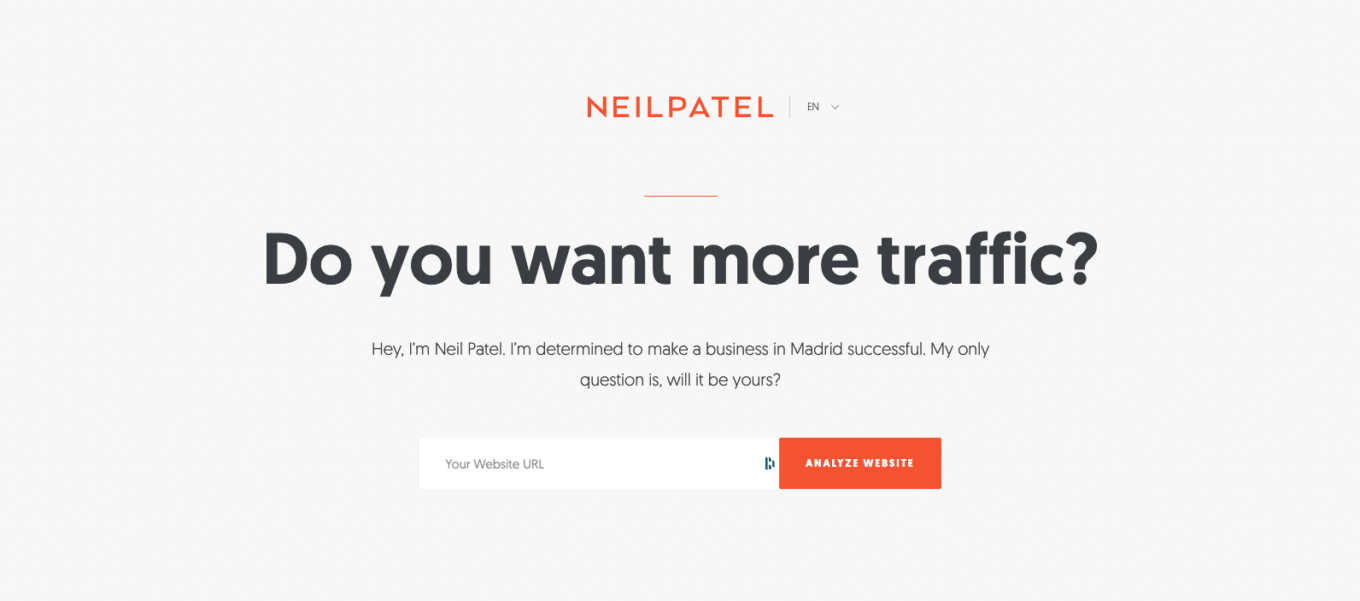
The headline is what makes people keep reading your copy. State your big promise in your headline if you want your reader to read on.
Write benefits-driven headlines and add numbers and stats so you are sure your headline will draw the reader’s attention.
Add urgency to your headline, and you have a better chance that your readers will read it and go through your landing page.
In addition to that, using the right font improves readability and the UX. Capitalize your headline and use a sans-serif font. In bold, it’s better.
The color of your headline must be in contrast with the other elements of the Landing Page, especially the background, to increase readability.
Here’s an example of a high-converting landing page with a grabby headline:
Source: Sortlist
Color Psychology Applied to Landing Pages
The color used in your landing page has to match the purpose of your brand and the color of your logo.
To choose the right color, you have to know your audience, their source, and their culture because colors have different meanings in different countries, especially if you are creating landing pages for clients.
To build your landing page, you can use a customizable template on a landing page builder or build your landing page from scratch.
When you design your landing page, don’t use more than three colors, but start with a dominant color and then mix the other two colors.
Even if you are not a web designer, knowing how to mix colors when you build a landing page is helpful.
If you are looking for inspiration, you can check out the Canva Color Wheel. It’s amazing. I love it!
Let’s delve into the psychology of the colors and the meaning of some colors…
Blue: Trust, confidence, dependability, productivity, loyalty, wisdom, competence, security, freedom, peace, and depth because it evokes the sea and the sky.
You can use it with landing pages for security, technology, accounting, finance, health care, and communication industries.
Purple: luxury, royalty, ambition, mystery, creativity, sophistication. But don’t overdo it.
It’s ideal for anti-aging product landing pages, and you can also combine it with pink. It’s ok for religion and non-profit organizations’ landing pages, too.
Orange: enthusiasm, happiness, determination, creativity, success, encouragement, comfort, freedom, fun, attraction, warning.
It’s perfect for CTA. You can use it for sports, art, and entertainment landing pages.
Red: urgency, energy, love, passion, boldness, power, attention, danger.
It’s ok for CTA. For food, entertainment, and sports landing pages.
Green: nature, freshness, quality, health, abundance, prosperity, welfare, growth, wealth.
You can use it for sales or marketing courses, environment, alternative energy, and external leisure landing pages.
Yellow: optimism, happiness, creativity. But don’t overdo it.
It’s perfect as a contrast for CTA buttons or borders, but not as a background. For sports, leisure, travel, and food landing pages.
Pink: sophistication, romance, sincerity, compassion, immaturity.
You can use it for beauty, fashion, women’s, and children’s products landing pages.
White: purity, clarity, peace, balance, neutrality, honesty, sincerity.
It matches every kind of landing page because it enhances readability.
Brown: comfort, stability, nature, honesty.
It’s perfect for agriculture, food, and legal landing pages.
Gray: professionalism, formality, neutrality.
You can combine it with other colors and use it to create landing pages for all biz.
Black: elegance, prestige, power, authority, glamour, control, discipline, sophistication.
You can mix the black color with others and use it, especially for luxury product landing pages, but also in many other industries.
The 60/30/10 Rule
When you choose the color to use on your landing page, you can also apply the 60/30/10 rule.
It means you have to use a dominant color on 60% of your landing page, which is the background.
The 30% is in the base elements of your landing page: the header, the text, and the footer.
The 10% is called the accent color. It’s the color used for the CTA button. You have to use a complementary color to the two colors used on your landing page to stand out.
The Most Powerful Landing Page Tools
Unbounce
With Unbounce, you can create customized landing pages easily and quickly.
You can build landing pages for small businesses, e-commerce, and many other biz with different goals in mind. For example:
Lead Generation
Email Marketing
Social Media Ads
Pay Per Click
Start for free, then you can choose the plan that best matches your needs.
The price changes based on traffic volume.
Here are the plans updated for 2026:
Starter
Build
Experiment
Optimize
Concierge
Agency
The Starter plan is $29 per month. If billed yearly, it is $22 per month.
The Build plan is $99 per month. If billed yearly, you’ll pay $74 per month.
For the Experiment plan, you have to pay $149 per month; billed yearly, $112 per month.
Another plan is “Optimize” at $249 per month, or $187 if billed yearly.
For the Concierge and Agency plans, you have to contact the team for customized pricing.
With Unbounce, you can create email marketing campaigns, sales funnels, business automation, run webinars, build websites, and create affiliate programs, online courses, and much more.
Clickfunnels
It’s a landing page platform, website, and sales funnel for entrepreneurs.
You can launch new products, sell digital products, generate leads, run webinars and events, and much more.
You can use templates or build your landing pages from scratch, and also add analytics integration to track your pages.
You can start for free and then choose your plan. The plans are:
Launch at $97 per month, billed monthly; $81 per month if billed yearly
Scale at $197 per month when billed monthly; $164 per month if billed yearly
If you choose the Optimize plan, you will pay $297 per month if billed monthly. If you opt for the yearly solution, you’ll pay $248 per month.
Dominate is an annual plan only, and you can get it for $5,997 per year.
Leadpages
You can use Leadpages to build landing pages, pop-ups, checkout forms, websites, and more. You have numerous templates to customize based on your needs.
It allows you to collect leads, sell all digital products, and check analytics that will help you better optimize your landing page.
Here are the new and updated plans:
You can opt for the Grow plan for $99 per month if billed monthly, or $79 per month if billed yearly.
You can choose the Optimize plan for $199 billed monthly; if billed yearly, you’ll pay $159 per month.
For the Scale plan, you’ll pay $399 if billed monthly, $319 if billed yearly.
For more info about AI credits and billing details, click here.
Instapage
It’s a platform for your landing page that helps you boost your Ad conversion rate.
You can personalize your landing page, do A/B testing, track your Ad campaign, and much more.
You can start with a 14-day trial. Then you can choose among three different plans:
Create at $99 per month or, if billed yearly, at $79 per month
Optimize for $199 per month or $159 when billed yearly
Convert is a customizable plan, and you can book a demo by filling out a form on the Instapage website
Landingi
It's a drag-and-drop landing page builder that allows you to build customized landing pages easily, sell digital products, create pop-ups, and integrate them with third-party tools, and more.
You can start with a 14-day free trial. Then choose the plan that matches your marketing needs among:
Build: for €29 per month if billed monthly, €24 when billed yearly
Optimize: for €29 instead of €139 as a first-month discount. After the first month, you’ll pay €139 per month when billed monthly, and €109 if billed yearly.
Scale: €269 per month if billed monthly, and €209 if billed yearly
Enterprise is €1350 per month when billed monthly. If billed yearly, you can get it for €1050 per month.
Swipe Pages
It’s a powerful landing page builder to create landing pages that convert, optimized for mobile and loading speed. No coding knowledge is required.
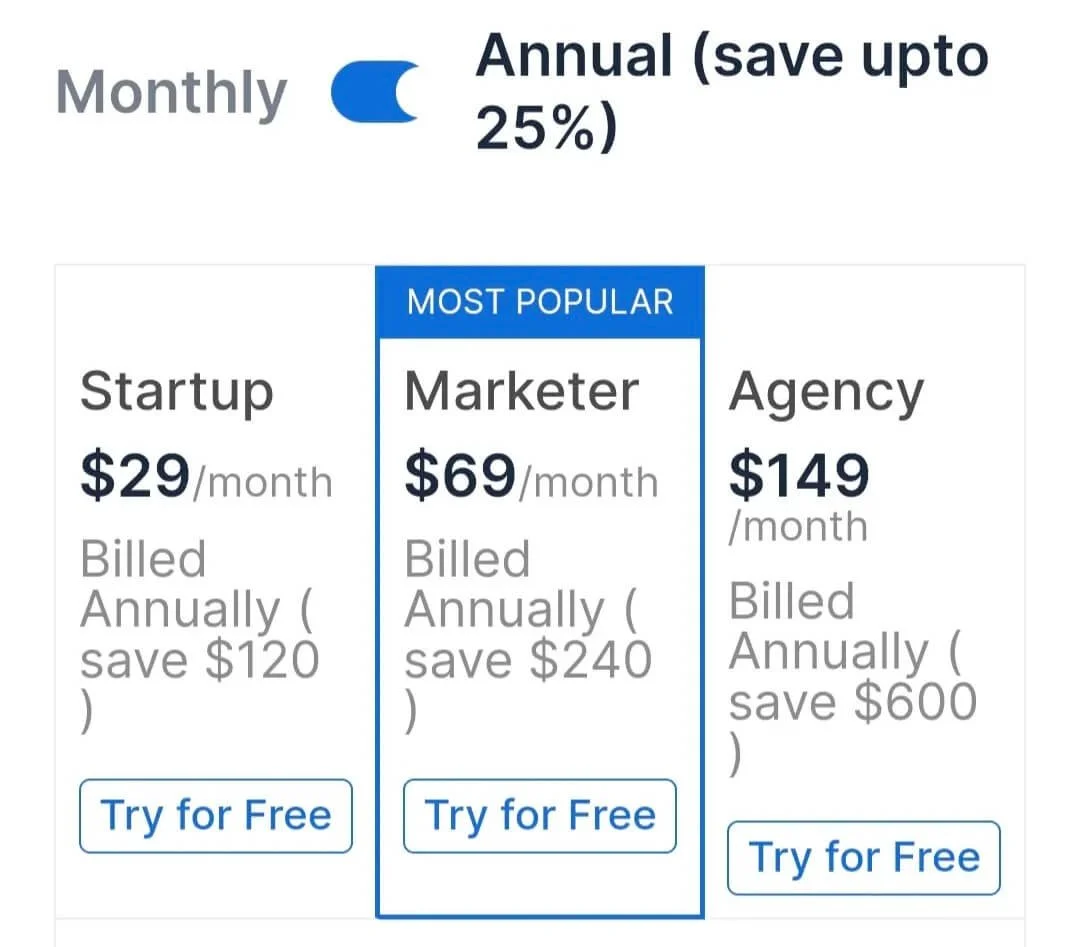
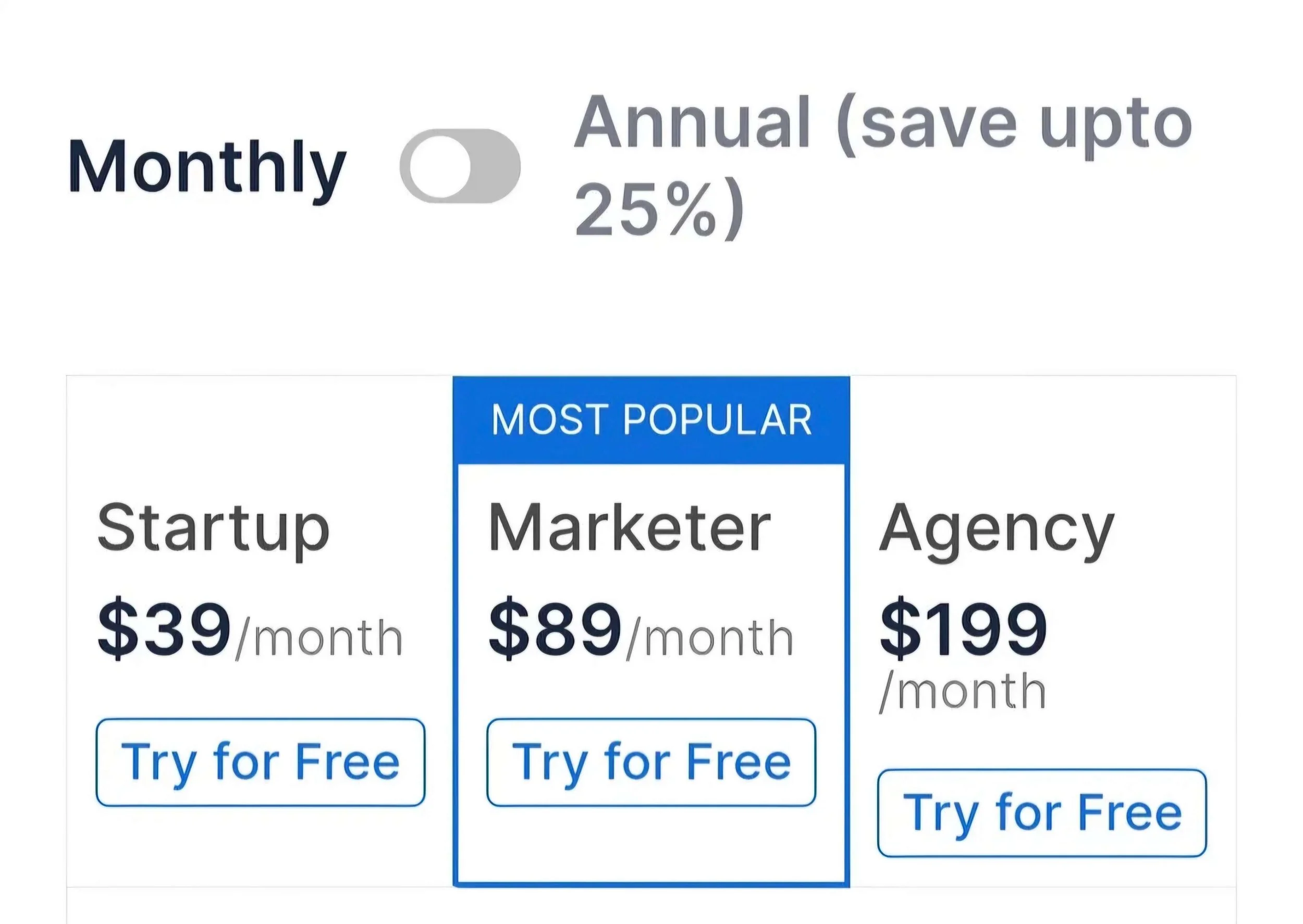
You can try it for free and then choose the best solution for you.
Here are the plans:
Source: Swipe Pages
Source: Swipe Pages
The Best Free Landing Page Tools
Systeme.io
It’s an all-in-one email marketing software that allows you to customize landing pages for free using the templates on the platform. It’s a great solution to run your online business with one tool.
It’s also the best alternative to other expensive platforms. You can start for free and have all the features, and continue for free up to 2,000 contacts.
But if your contact list starts growing, you can unlock other features by choosing a paid plan.
Here are the different options:
Startup: For $17 per month, billed monthly. If billed yearly, you’ll pay $170
Webinar: For $47 per month, $470 if billed yearly
Unlimited: $97 per month for the monthly plan, $970 for the yearly plan
Custom: It’s a customized solution built for teams. If you opt for this solution, you have to contact the company to book a call.
If you opt for a yearly plan, you get two months free.
Kit
Kit, formerly Converkit, is an email marketing software for content creators.
You can use free landing page templates to customize, create Lead Capture pages quickly, sell digital products, and create an automated sales funnel.
The plans change based on the number of your subscribers. You can start with a 14-day free trial and then choose the plan you need.
The plans are:
Free: up to 10,000 subscribers
Creator: $39 per month if billed monthly, $33 per month if billed yearly.
Pro: $79 per month if billed monthly, $50 per month if billed yearly.
For more pricing details, click here.
Canva
Originally built as an all-in-one graphic design tool, and I think it's one of the best tools on the market, it’s also a zero-code one-page website/landing page builder.
You can choose among hundreds of templates the one that best fits your business needs, and build up to 5 websites or one-page landing pages using a custom domain for free.
You can start for free and upgrade later.
Pricing plans
Billed monthly:
Pro: $12 per month
Business: $17 per month
Enterprise: It’s a custom solution, and you have to contact the company to book a demo
Billed yearly:
Pro: $110 per year
Business: $170 per year
Enterprise: It’s a custom solution, and you have to contact the company to book a demo
Quick Pages
It’s a responsive landing page builder, totally free. You can customize templates based on your marketing goals.
It provides a landing page tracking system to analyze metrics and check what works and what doesn’t.
You can start for free and upgrade later.
Here are the paid plans you can choose from:
Year Pro for a $20 one-time payment for a full year
Lifetime Pro for a $50 one-time payment for lifetime use without an expiry date
Landing Page Optimization: Best Practices
To create high-converting landing pages, you need to know some best practices that help you a lot.
Let’s break them down:
Optimize for SEO to rank high on Google
Use the PAS framework
Speed up your landing page
A/B test your landing page
Test and measure
To design an engaging landing page, the first thing you have to do is put yourself in the reader’s shoes.
So start studying the behavior of your audience to know what they like, share, or are interested in.
Then study the market, analyze your competitors to know which landing pages convert the most, and look at the trends in your field at the time of your research.
Design your landing page depending on the goal you have in mind and what kind of offer you have to make
Keep it simple and free the page from any navigation bar and other elements that can distract the reader.
Add urgency to your landing page. For example, if you have a landing page to register for a webinar, you can encourage your reader to take action by adding a countdown to convey “urgency”.
Highlight the reasons why it is important not to think too much before hitting the CTA button.
Similar to urgency is scarcity. You can create a landing page for a limited number of seats for an online course, a workshop, etc.
You can also add a live chat service to boost conversions on your landing page to help visitors when they need more information.
Optimize for SEO to Rank Higher on Google
If you want your landing page to rank high on Google, you have to write it by choosing the right keywords, even for one-time offer landing pages, and optimize your landing page for SEO.
First of all, brainstorm keywords and create a Google Sheet with a list of the most relevant keywords for your page. Choose long-tail keywords because they rank better. Research your keywords using keyword tools like Semrush, Ahrefs, etc.
Then put your keyword on your landing page. Use header tags: H1 for the headline and H2 for the subhead, and put your keywords into your headers, H1 and H2.
Include them in the alt text of the image on your landing page, your meta description, and title tag.
Another best practice that helps your landing page rank high on Google is to avoid duplicate content and keyword stuffing.
Types of Keywords Based on Keyword Search Intent
To optimize your landing page, choose the right keywords considering your audience's keyword search intent.
Based on search intent, you can have these types of keywords:
Navigational
Transactional
Informational
Commercial
When people search on the internet for a certain website, you have Navigational keywords.
Transactional keywords are related to any action people take by clicking a CTA button. For example, when they buy something and hit the “Buy Now” button, or when they enroll in a course.
Informational keywords are specific keywords people use when they go on the internet to search for info about a topic and learn more about it.
Commercial keywords are related to any search people do before buying something, often to search for information about different products and compare them.
Use the PAS Framework
When you write your landing page, you can use the PAS Framework.
PAS stands for Problem, Agitate, Solution. What does it mean?
Tell your readers about the problem they have, agitate it by stressing the consequences of not taking action so they want to know more about a solution, and then offer your product as the solution.
That’s it.
Speed Up Your Landing Page
Another important thing in the optimization process is the landing page speed.
The faster the page loads, the more your visitors are likely to read on instead of leaving without reading your landing page.
To speed up your landing page, avoid overly large images. Small ones are better, or if they are too large, resize or compress them.
If you use WordPress to build it, delete the plugins you don't need.
A/B Testing Your Landing Page
A/B testing helps you analyze which version of your landing page converts best. How can you run an A/B test? Build your landing page, version A, and then create version B by changing and testing one element at a time, such as the headline, CTA, images, or whatever you want to test, to see which one drives more conversions.
Whether you’re launching a new product, scaling ad budget, or targeting a new audience, A/B testing provides insights that help you understand what works best and what doesn’t on your landing page.
Test and Measure
Before testing, you have to decide which KPIs you want to consider to analyze which landing page converts more.
The most relevant metrics to measure are:
Conversion Rate
Bounce Rate
Pageviews
Average Time On Page
New Users
Form Abandonment
Return Users
Traffic Source
Cost Per Acquisition
Revenue Per User
Conversion Rate
It’s the percentage of readers who clicked the CTA button and took the action you asked them for.
You can calculate it as:
Number of conversions / Total number of visitors
Bounce Rate
It’s the percentage of people who enter your landing page and exit it without clicking your CTA button.
Pageviews
It’s the number of times readers have viewed your landing page. To measure that KPI, you have to use Google Analytics.
Average Time on Page
It measures the average time visitors spend on your landing page.
New Users
It’s the number of people who visit your landing page for the first time
Form Abandonment
It measures the number of people who land on your landing page, start filling out the form, but then exit the page without completing it.
Return Users
This metric measures the number of readers who come back to visit your landing page.
Traffic Source
Knowing the traffic source that lands on your landing page is important to monitor which landing page converts more.
For example, which landing page converts more? The landing page with the traffic coming from your email list or from social media?
That will help you understand what worked well and what didn’t.
Cost Per Acquisition (CPA)
It’s the average cost you pay for every new customer acquisition.
Revenue Per User
It’s a KPI measured on e-commerce landing pages.
You can calculate it as:
Total revenue from sales / total number of buyers
To Wrap Up
Landing pages are a powerful digital marketing tool that helps you turn simple visitors into buyers.
There are many types of landing pages, and to know which one you need, you have to think about the goal of your campaign and study your target audience.
Then you can decide to build it from scratch or use the templates you can find in landing page builder software.
Remember, to build a high-converting landing page, you have to follow some best practices.
First of all, when you customize your template, put yourself in the buyer’s shoes.
Write catchy and concise headlines, and design your landing page considering that the colors you use can influence the buyer’s decision process.
Mix your colors applying the 60/30/10 rule and consider the meaning of each color according to the psychology of colors.
You can use free or paid landing page builders, and if you want to rank high on Google, when you brainstorm your keywords, it’s important to consider the keyword user intent and choose long-tail keywords, but avoid keyword stuffing.
Use the PAS Framework to highlight the problem, agitate it, and give your solution.
Test and measure the effectiveness of your landing pages by monitoring the KPIs using tracking tools like Google Analytics.
Finally, optimize the speed of your landing page because it’s an essential factor in increasing conversions.
So that’s my guide to building high-converting landing pages.
Note: This article was originally published on Medium.
Disclosure: This article includes links, but none of them are affiliate links. If you click on them, buy a product, or sign up for a subscription, I don’t get any commission.
Need High-Converting Copy?
Whether you have a question about this article or want to discuss your next project, I’d love to connect. Click below to request your free audit and start the conversation.